
How to Optimise Database Schema for Scalability

How to Optimise Database Schema for Scalability
Your database might work fine now, but can it handle millions of users or terabytes of data later? Scaling databases is tricky, and a poorly designed schema can cause massive slowdowns as your data grows. Here’s the gist of what you need to know:
- Scaling Approaches: Vertical scaling (adding more resources to a server) is limited. Horizontal scaling (distributing data across servers) is better for growth using methods like sharding.
- Key Issues: Unindexed joins and hotspots (e.g., sequential keys causing bottlenecks) are common problems when scaling databases.
- Schema Design Tips:
- Balance normalisation (reduce redundancy) and denormalisation (speed up reads).
- Use the smallest data types possible (
INToverVARCHAR). - Avoid sequential keys for distributed databases - use UUIDs or hashed keys instead.
- Indexing: Use covering indexes for faster queries, but don’t over-index as it slows down writes.
- Partitioning & Sharding: Partition large tables to improve query performance. Shard data across servers to handle massive growth, but choose shard keys carefully to avoid uneven loads.
- Continuous Monitoring: Keep an eye on query performance, hotspots, and table bloat. Regular tweaks are essential to keep things smooth.
Takeaway: Building scalability into your database schema from the start saves you from headaches later. Plan for growth, monitor performance, and adjust as your data and user base expand.
7 Must-know Strategies to Scale Your Database
Schema Design Strategies for Scalability
Getting your schema design right from the beginning can make all the difference between a database that scales gracefully and one that becomes a bottleneck. Here are some strategies to help you build a schema that supports growth without compromising performance.
Normalisation vs Denormalisation
When it comes to scalability, finding the sweet spot between normalisation and denormalisation is crucial.
Normalisation is all about reducing data redundancy by splitting data into related tables. It's a great fit for OLTP (Online Transaction Processing) systems where maintaining consistency and handling high write loads is a priority. The downside? Normalisation can slow things down in distributed databases because queries often require costly cross-partition joins, which increase latency.
On the flip side, denormalisation intentionally duplicates data to speed up reads. This approach is ideal for OLAP (Online Analytical Processing) systems or read-heavy workloads where fast query performance is non-negotiable. With denormalisation, queries can often grab all the data they need from a single table, cutting down on I/O and network overhead. However, the trade-off is that write operations can become more complex and slower since redundant data needs to be updated in multiple places.
Take distributed databases like Google Spanner, for instance. They use "row trees" - a root row and its descendants grouped in a single split - to avoid cross-server communication, a clever form of denormalisation that focuses on keeping related data local. Similarly, covering indexes, where a nonclustered index includes all the columns a query needs, can eliminate the need to query the base table, trading extra storage for faster reads.
Most scalable systems blend the two approaches. For example, you might normalise your core transactional data but denormalise frequently accessed reference data or use materialised views to precompute complex query results. The trick is to analyse your data access patterns early on and decide whether you're optimising for writes (lean towards normalisation) or reads (go for denormalisation).
Selecting the Right Data Types
The data types you choose can have a surprisingly big impact on scalability. The rule of thumb? Always pick the smallest data type that fits your data. Smaller data types mean less storage, faster I/O, and reduced memory usage, which benefits both your base tables and indexes.
For example, fixed-width types like INT (4 bytes) are more efficient than variable-width ones like VARCHAR, which tack on an extra 2 bytes to track the length. Nullable columns also come with extra storage costs, so declare them as NOT NULL whenever you can.
Primary keys in distributed databases deserve special attention. Sequential keys, like auto-incrementing numbers, can create hotspots that overload specific partitions. Instead, opt for something like a UUID Version 4, which distributes writes evenly across the key space. If you’re stuck with sequential keys, consider bit-reversing the values or adding a ShardId column based on a hash to spread the load more evenly.
Also, steer clear of using large objects (LOBs) like TEXT, IMAGE, JSON, or VARCHAR(MAX) as index keys. These can make query optimisation a nightmare. A better approach is to store large binary files or lengthy text in external blob storage and keep only a reference in the database. This keeps your rows lean and improves scanning performance.
Managing Schema Changes Over Time
No matter how well you design your schema, changes will be inevitable as your application evolves. The challenge is making these updates without breaking everything or causing downtime.
One way to handle this is vertical partitioning - splitting frequently accessed columns from larger, less-used ones. This lets you add new fields without slowing down queries that don’t need them. Another approach is starting with nullable columns, which makes it easier to add fields later without disrupting existing data.
In distributed systems, schema changes can be even trickier since updates need to be coordinated across multiple nodes. Many modern databases offer online schema changes that don’t require downtime, but you’ll still need to watch out for issues like replication lag and compatibility across different schema versions. Planning for backward-compatible changes - like adding new columns instead of removing them or using views to support multiple schema versions - lets you roll out updates gradually.
Before making changes, take time to analyse your data access patterns. Look for columns with lots of NULL values or high cardinality, as these insights can guide your indexing and partitioning strategies. It’s much easier to build scalability into your schema from the start than to retrofit it later when your database is already under strain.
Performance Optimisation Techniques
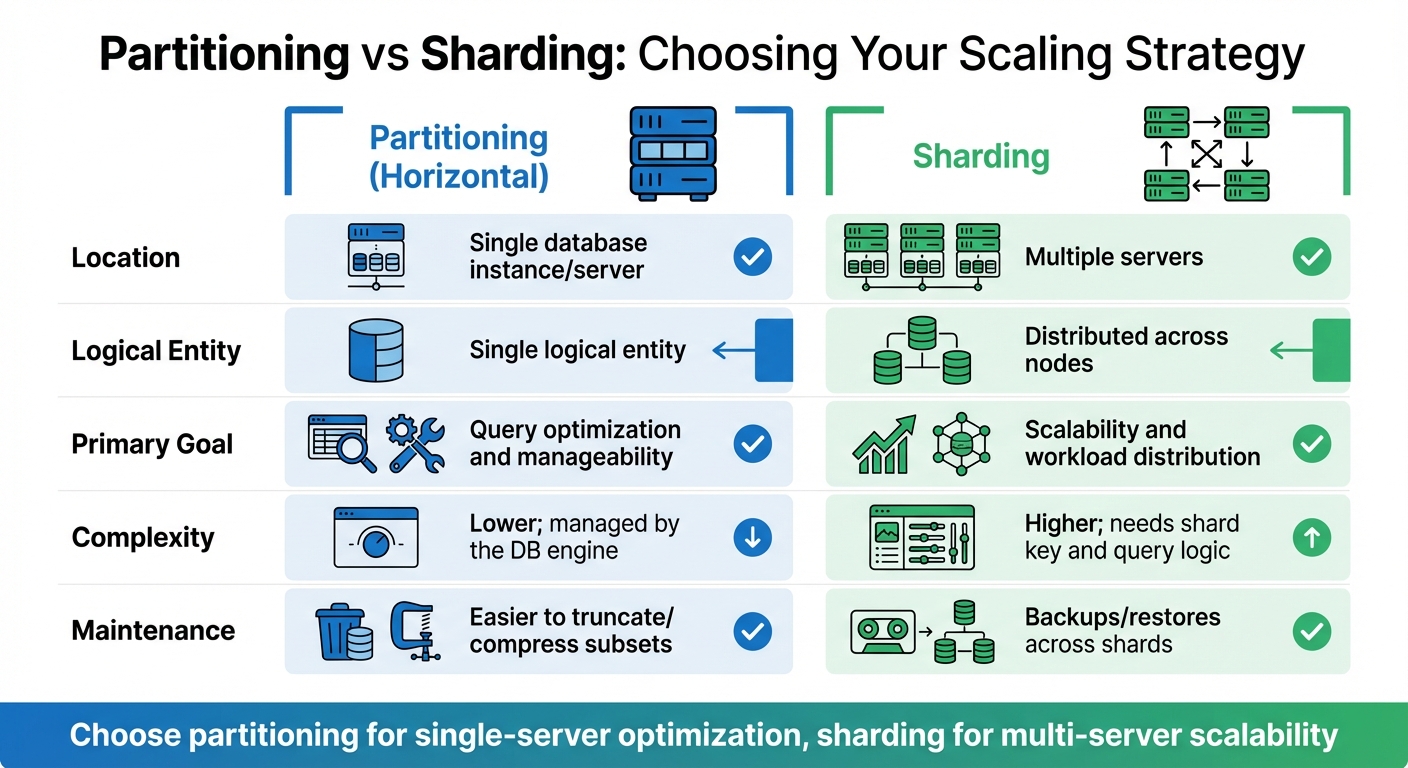
Database Partitioning vs Sharding: Key Differences for Scalability
Once you've nailed down a solid schema design, it’s time to focus on techniques that can speed up queries and make the most of your resources. These approaches help keep query times low and ensure your system can handle growth without breaking a sweat.
How to Use Indexing Effectively
Indexes are like shortcuts for your database - they speed things up when used the right way. Clustered indexes physically organise table data (you only get one per table), while nonclustered indexes create separate lookup structures for faster data retrieval. Use clustered indexes for sorting table data and nonclustered ones for quick lookups.
A game-changer in indexing is the covering index. This type of index includes all the columns a query needs in its SELECT, JOIN, and WHERE clauses, so the database can fetch everything directly from the index without even touching the main table. This can massively cut down on I/O operations. For example, adding a missing index to a poorly performing query can reduce response times by 50% to 90% - a huge win for performance [11].
When designing composite indexes, order matters. Place columns used in equality conditions first, followed by those in range conditions. Also, prioritise columns with higher distinct values (cardinality). For instance, in a query filtering by Country and City, you’d want City first if it has more unique values.
In distributed databases like Google Spanner, interleaved indexes help by keeping index entries close to their parent data. This improves data locality and makes joins more efficient [8].
Keep your index keys as narrow as possible. For example, using an int (4 bytes) instead of a uniqueidentifier (16 bytes) can save storage and reduce I/O overhead, especially across nonclustered indexes [7]. Also, avoid queries with leading wildcards like LIKE '%phrase', as they force a full index scan. Stick to trailing wildcards like LIKE 'phrase%' for better performance [11].
Another common pitfall is implicit data type conversions. If you compare an INT column to a string (WHERE IntCol = '1'), the database might convert the column values, making the index unusable [11]. Always match query parameters to the column’s data type. And don’t forget to regularly check Dynamic Management Views (DMVs) to spot unused indexes. Over-indexing can really slow down INSERT, UPDATE, and DELETE operations because every index needs updating [7][5].
Once indexing is in good shape, partitioning can take optimisation even further.
Partitioning for Large Datasets
Partitioning is a great way to handle large tables by breaking them into smaller, more manageable chunks, all within the same database instance. These partitions can sit on different filegroups or storage units, which helps spread the load [10][5].
The key benefit is partition elimination. When your query only needs data from specific partitions, the database engine skips the irrelevant ones, saving on I/O [10]. Modern systems like SQL Server allow up to 15,000 partitions per table or index [10]. However, if you're working with hundreds or thousands of partitions, make sure your server has at least 16 GB of RAM to handle the workload without choking on memory-intensive tasks [10].
Another option is vertical partitioning, which splits a table by columns instead of rows. This works well when some columns are accessed far more frequently than others. For example, you could split a CustomerProfile table into a primary table with commonly accessed fields like name and email, and a secondary table with less-used fields like detailed preferences or notes [5].
It’s worth noting, as Microsoft points out, that partitioning doesn’t always boost performance in OLTP systems where most queries are single-row lookups [10]. Partitioning is better suited for large analytical queries or when you need to manage data lifecycle tasks, like quickly truncating old data without locking the entire table.
Sharding for Horizontal Scaling
When your dataset grows too big for a single server, sharding is the way to go. Unlike partitioning, which keeps data on one server, sharding spreads data across multiple servers (shards). Each shard functions as an independent database holding part of the total data [12][5].
The choice of a shard key is crucial. It should be stable (not frequently changing), present in all sharded tables, and have high cardinality to ensure an even data spread. For example, User ID or Country could work well. Be cautious, though - a poorly chosen shard key can lead to uneven data distribution and overload certain shards [13].
To avoid hotspots, steer clear of sequential primary keys (like auto-increments). Instead, use bit-reversed sequences or pseudo-random UUIDs to ensure writes are evenly distributed [8].
Sharding does add complexity, especially with cross-shard queries. The scatter-gather approach sends queries to all shards and combines the results at the application layer [12]. To reduce cross-shard operations, replicate reference data (e.g., product catalogues) to every shard. This allows local joins and speeds up queries [13].
One thing to avoid in sharded setups is global indexes. They can slow down operations like moving data between shards. Stick with local indexes to maintain performance [13].
| Feature | Partitioning (Horizontal) | Sharding |
|---|---|---|
| Location | Single database instance/server [10] | Multiple servers [12] |
| Logical Entity | Single logical entity [10] | Distributed across nodes [5] |
| Primary Goal | Query optimisation and manageability [10] | Scalability and workload distribution [12][5] |
| Complexity | Lower; managed by the DB engine [10] | Higher; needs shard key and query logic [12][13] |
| Maintenance | Easier to truncate/compress subsets [10] | Backups/restores across shards [12] |
sbb-itb-fe42743
Monitoring and Continuous Optimisation
Schema optimisation isn’t a one-and-done task - it’s an ongoing process. As your data grows and usage patterns evolve, keeping a close eye on your database’s performance is essential. Without regular checks, bottlenecks can sneak in and wreak havoc before you even notice.
This continuous monitoring builds on your earlier optimisation efforts, helping you anticipate and address potential issues before they escalate.
Tracking Database Performance
The trick to staying ahead of database performance problems lies in monitoring the right metrics. Things like query execution times, throughput, and wait statistics can clue you in if your queries are bogged down by complex joins or missing indexes [5]. If you’re seeing high CPU usage, memory saturation, or excessive disk I/O, it’s often a sign of deeper schema issues - like inefficient data types or poor indexing [2][5].
Take index usage statistics, for example. Tools like pg_stat_user_indexes in PostgreSQL or sys.dm_db_index_usage_stats in SQL Server can show you which indexes are actually being used. If an index hasn’t been scanned even once, it’s just adding unnecessary overhead during writes - ditch it [7][2]. On the flip side, if you’re noticing full table scans in your execution plans (easily checked with EXPLAIN ANALYZE), then you’re probably missing a critical index that could save you a lot of time [2][5].
In distributed systems, keeping an eye on hotspots is crucial. For instance, Google Cloud Spanner automatically creates a new split when a data partition hits about 8 GiB [3]. But if one node is handling way more requests than the others, you’ve likely got a hotspot - often caused by a shard key that’s too predictable, like a timestamp that keeps increasing [3][8]. Monitoring RPCs and lock contention per split can help you catch these imbalances early on.
And don’t forget about table bloat. If the ratio of dead to live tuples is too high, your schema isn’t making efficient use of storage. This leads to wasted I/O and space, so scheduling regular vacuuming or index rebuilding is key [2][5]. Modern cloud databases, like Azure SQL and Google Spanner, even offer AI-based recommendations to detect hotspots and suggest schema tweaks based on real-time workloads [3][5].
Once you’ve got these performance insights, you can refine your schema to avoid future headaches.
Refining Schema Design Over Time
After pinpointing performance issues, the challenge is to refine your schema without disrupting your operations. Online indexing can be a lifesaver here. Using the ONLINE option during index creation or rebuilding ensures your database remains accessible [7]. For bigger tasks, like repartitioning or sharding, a two-stage migration can help. In this approach, your application reads and writes to both the old and new partitions until the transition is fully complete [6].
Testing changes on a smaller scale - like deploying updates to a limited set of nodes (canary deployment) - is another smart move to catch problems early [1]. Tools like SQL Server Query Store are great for tracking historical execution plans, making it easier to spot when a schema update causes a performance dip [7]. Regularly reviewing index usage stats to weed out redundant indexes can also boost write performance and save on storage [5][7].
As datasets grow (and some organisations now manage over 100TB of data [2]), it’s worth implementing processes to archive or purge older, less frequently accessed data. This keeps your active dataset lean and efficient [5][6]. Staying on top of monitoring and making incremental improvements ensures you’re ready to tackle scalability challenges before they become full-blown problems.
Conclusion
Building scalability into your database schema isn't just a nice-to-have; it's a must from day one. As Dhanush B, a Data Intelligence Expert, wisely notes:
Retrofitting scalability into an existing database is significantly more challenging and risky than building it in from the start [1].
Getting your early design decisions right - like choosing the right primary keys and planning for partitioning - sets the stage for a system that can grow seamlessly. These decisions aren't just technical details; they shape how well your database can adapt to future demands.
Take primary keys, for example. Avoid those monotonically increasing keys that can lead to hotspots [3][8]. Instead, go for alternatives like UUID Version 4 or bit-reversed sequences [3][4]. Balancing normalisation and denormalisation is another key move. Normalisation ensures data integrity, while strategic denormalisation and indexing foreign keys can supercharge query performance [1].
When your data starts to balloon, techniques like partitioning, sharding, and interleaving become your go-to tools for scaling out effectively [6][8]. Organisations today regularly handle datasets well over 100TB [2], and those systems didn't just stumble into managing that scale - they were designed with growth in mind.
The MySQL 8.4 Reference Manual sums it up well [9]: a well-designed database doesn't just make scaling easier; it also makes developing high-performing applications simpler. Add in regular monitoring and ongoing tweaks, and you've got a recipe for a database that keeps up with your users' expectations.
The key takeaway? Think ahead, keep an eye on performance, and tweak as you go. By embedding scalability into your design from the start and staying proactive as your needs evolve, you'll ensure your system stays fast and reliable - keeping your users happy and your operations smooth.
FAQs
What is the difference between normalisation and denormalisation when scaling a database?
Normalisation is all about tidying up your data. It involves breaking data into smaller, related tables to cut down on redundancy and keep things consistent. Think of it as decluttering a messy room - everything has its place, which makes managing and scaling the database much easier. For example, instead of storing the same customer details in multiple tables, you'd create a single table for customer information and link it to other tables as needed.
Denormalisation, however, takes a different approach. It deliberately adds redundancy by combining tables or duplicating data to improve performance, particularly for read-heavy operations. This method can speed up queries by reducing the need for complex joins. Imagine a reporting dashboard that needs lightning-fast data retrieval; denormalisation can make that happen by keeping all the relevant data in one place, even if it sacrifices a bit of consistency.
Both methods have their strengths, and the right choice depends on what your application needs. If you're aiming for consistency and scalability, normalisation might be your go-to. But if speed and quick data access are more critical, denormalisation could be the better fit. It’s all about balancing your priorities and workload patterns.
How can I select the best shard key to ensure smooth data distribution?
Choosing the right shard key is a game-changer when it comes to keeping your database running smoothly and scaling efficiently. Here's how to get it right:
- Know your application's access patterns: Take the time to figure out how your data is being queried. Your shard key should match these patterns to minimise unnecessary complexity and improve performance.
- Spread the load evenly: Pick a key that ensures data is distributed equally across all shards. This helps you avoid hotspots - those pesky situations where one shard gets overloaded while others sit idle.
- Index the shard key: Including the shard key in your indexes can work wonders for query performance. It reduces the need for cross-shard operations, which are often a drag on speed.
Paying attention to these points can save you from headaches down the line and keep your database humming as your app grows.
Why is it crucial to continuously monitor database performance?
Continuous monitoring of database performance is key to ensuring your system can grow smoothly as your data expands. By tracking performance consistently, you can spot and fix issues quickly, fine-tune queries, and keep your database running efficiently and dependably.
Staying on top of performance not only helps avoid bottlenecks but also improves response times and prepares your database to manage heavier workloads down the line - all without sacrificing performance.